
About:
This project focuses on the design of a system for automated night-time access and onboarding of new users at a coworking centre.
The inspiration comes from a simple problem: people without membership can’t use the coworking centre during night hours, whether they need it randomly, in transit, or for urgent work.
Category:
Interaction design
Client:
B Work, Masaryk University
Year:
10/2024 – 01/2025
Location:
B Work, Bali, Indonesia
Design framework:
Design Thinking, Human-Centered Security
Tools:
Figma, FigJam, Microsoft Teams, Google Sheets, Typeform, Scite.ai
Research
Define
Ideate
Outcome
The problem:
Coworking centres operate strictly during business hours. Anyone arriving at night, in transit, or with urgent work has no way to register, pay and access the space without staff being present, so the centres lose demand they can’t capture.
Goal:
Design and prototype a self-service kiosk that lets new users register, pay and access a coworking centre 24/7 without staff assistance, increasing usability and revenue.
My role:
UX/UI designer, solo: research, workshop facilitation, prototyping and testing.
Methods:
•
Service safari
•
Stakeholder questionnaire
•
Surveys and interviews
•
Empathy map
•
Qualitative personas
•
UX project brief
•
Competitor analysis
•
Problem statement
•
How Might We workshop
•
Affinity mapping and dot voting
•
Storyboarding
•
Low and high-fidelity prototyping
•
Moderated user testing
•
Heuristic review
Discovery
It started with my own problem: landing in Bali late at night with research calls to run, and no coworking that would let me in.
/01
The story
I work for a European company and need to be online during European hours. Flying back from Australia to Bali, I had user research scheduled late in the evening and planned to work from a coworking centre.
None of the coworking centres I found offered immediate onboarding or after-hours access. Was this just my case, or the standard? I started to investigate, focusing on one of the best known centres in Bali: B Work.
/02
Service safari
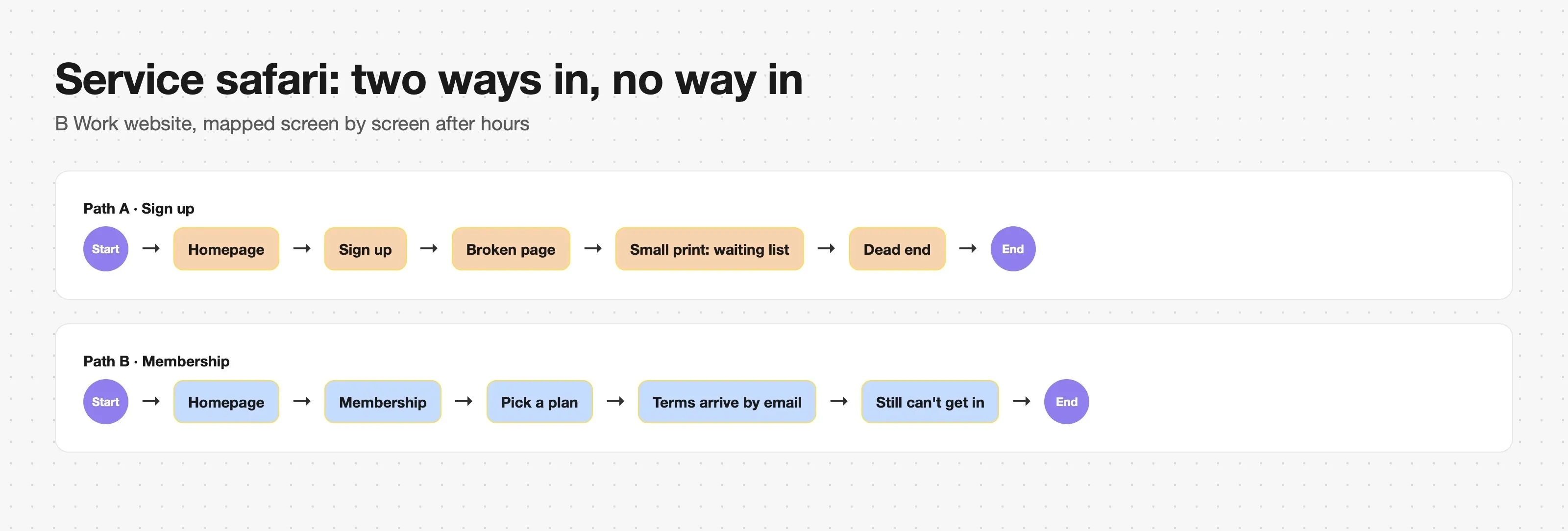
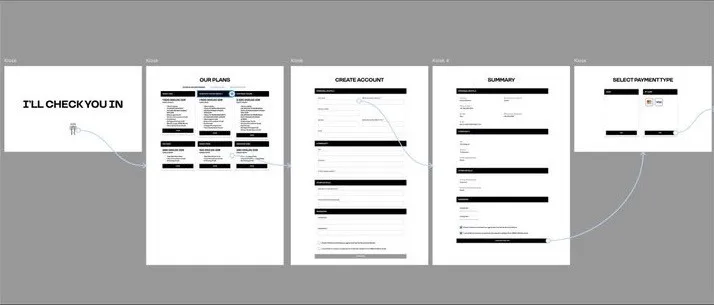
The website offered two ways to register. Sign up led to a broken page with small print about a waiting list. Membership let you register, pick a plan and receive the terms by email, yet still not get in.
I mapped both paths screen by screen into a flow, then went to B Work in the late hours to find out why it works this way.
/03
Observation and stakeholder interview
Through the staff on WhatsApp I reached the general manager, who was not on site, and sent him about ten open questions. Two mattered most: why the website supports registration but not payment, and whether the centre wants automatic night-time registration at all.
Registrations run physically during working hours, to keep the overcrowded centre at capacity.
Management would welcome any system that registers people outside business hours.
/04
User surveys and interviews
A questionnaire with open and closed questions asked whether people want night registration and how they imagine self check-in. 12 responses came in online. I then asked 6 more members in person at the centre. The answers did not differ, and the hypotheses held.

/05
Empathy map
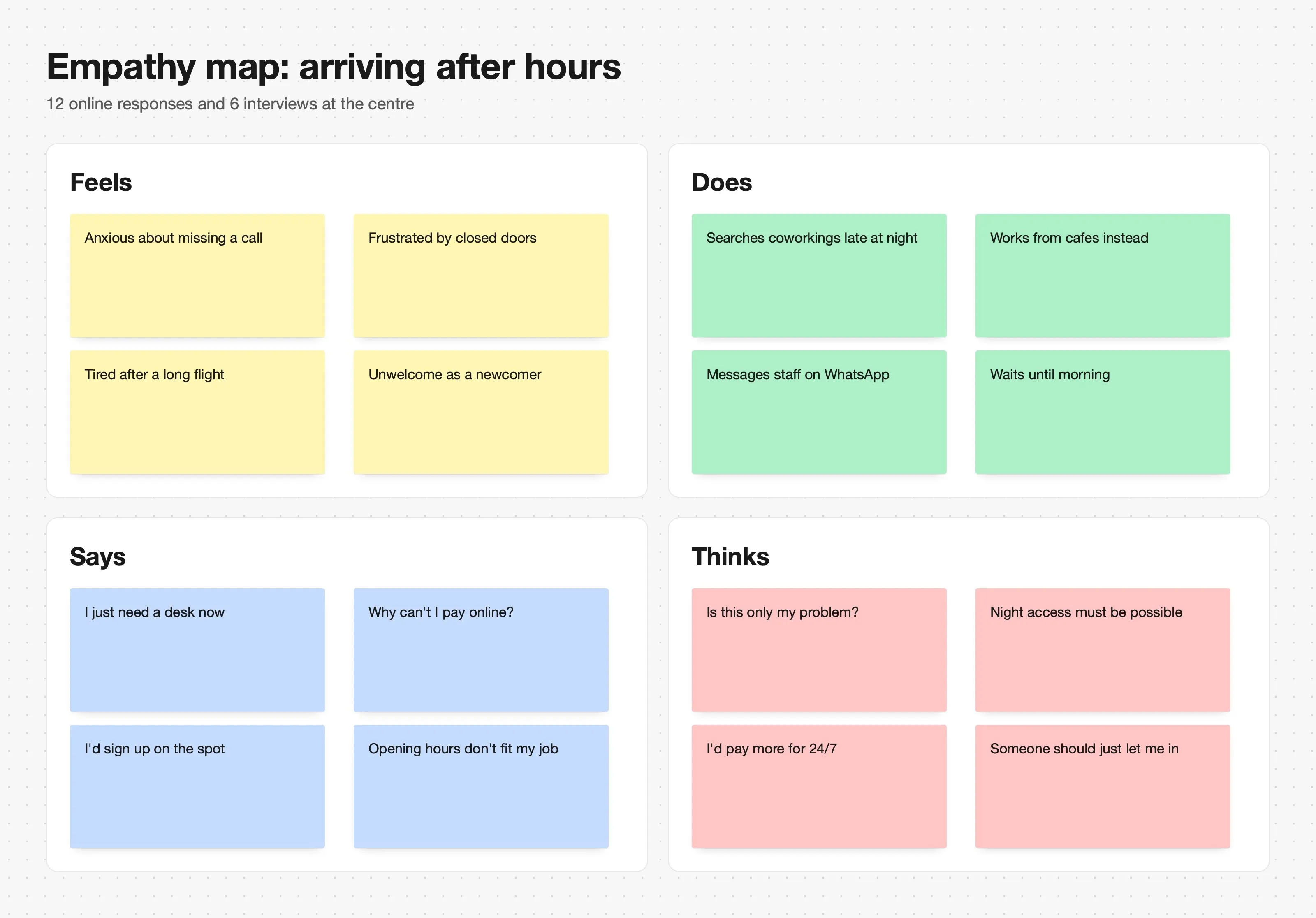
Feels, does, says and thinks: the empathy map organised what surveys and interviews revealed about registering and getting in outside opening hours.
/06
Personas
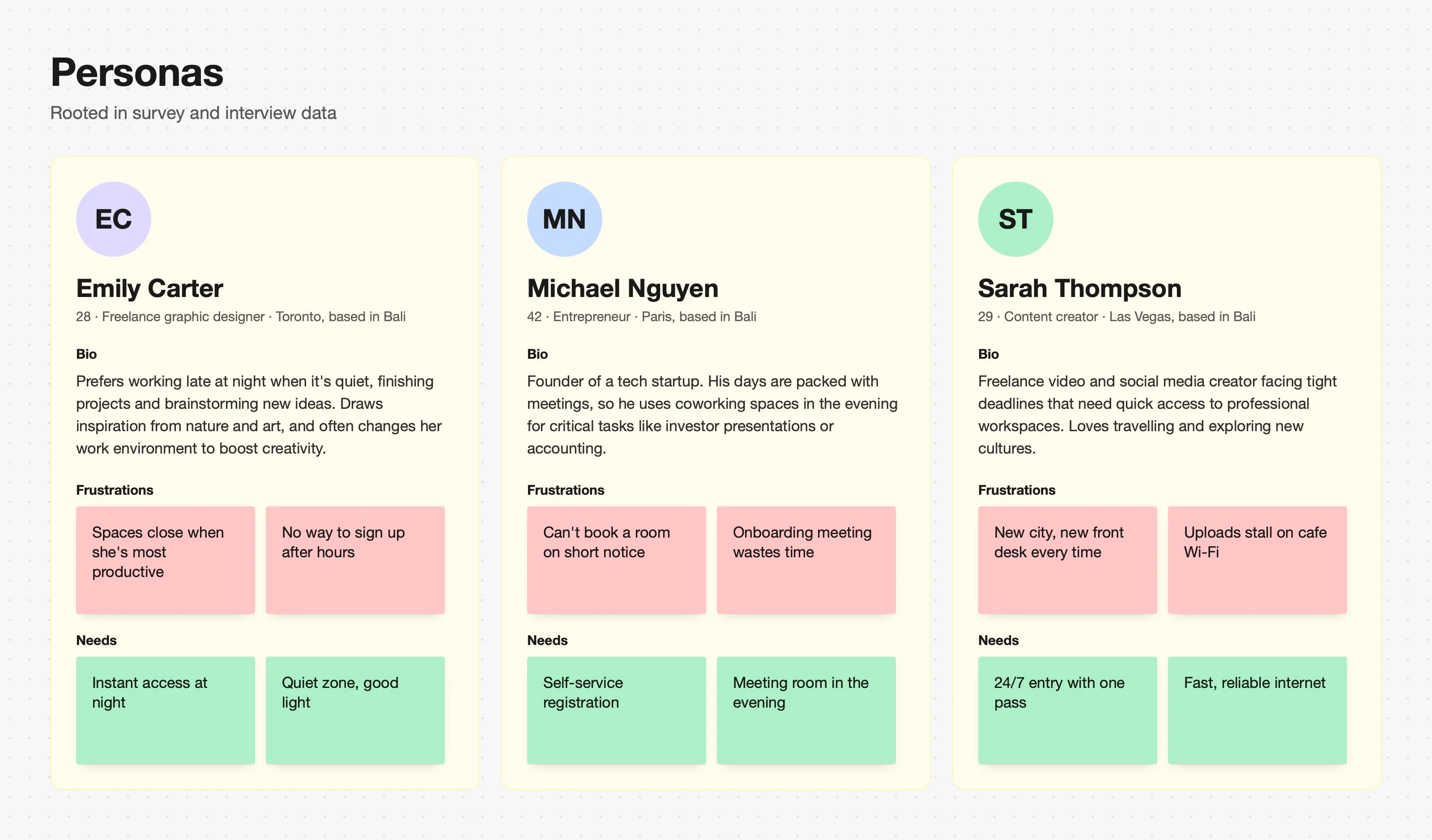
Three personas rooted in the data: Emily, a freelance designer who works best at night; Michael, a founder whose days are full of meetings; Sarah, a content creator on tight deadlines who travels a lot.
Define
With the problem confirmed, I wrote a UX project brief and checked how others solve it.
/01
UX project brief
Following the advice of my interaction design teacher Matěj Kaninský (Masaryk University), I compiled a UX project brief.
Vision: 24/7 access to coworking with simple registration and onboarding.
Value: automated registration and access, secure and immediate use without membership.
Success metrics: registrations and entries outside opening hours, frequency of reuse, accessibility, lower operating costs.
Audience: people arriving late at night, freelancers needing space for urgent work.
Requirements: quick registration, multilingual intuitive interface, identity verification and access logging.
Risks: low adoption, integration with existing infrastructure, security at night, technical failures.
/02
Competitor analysis
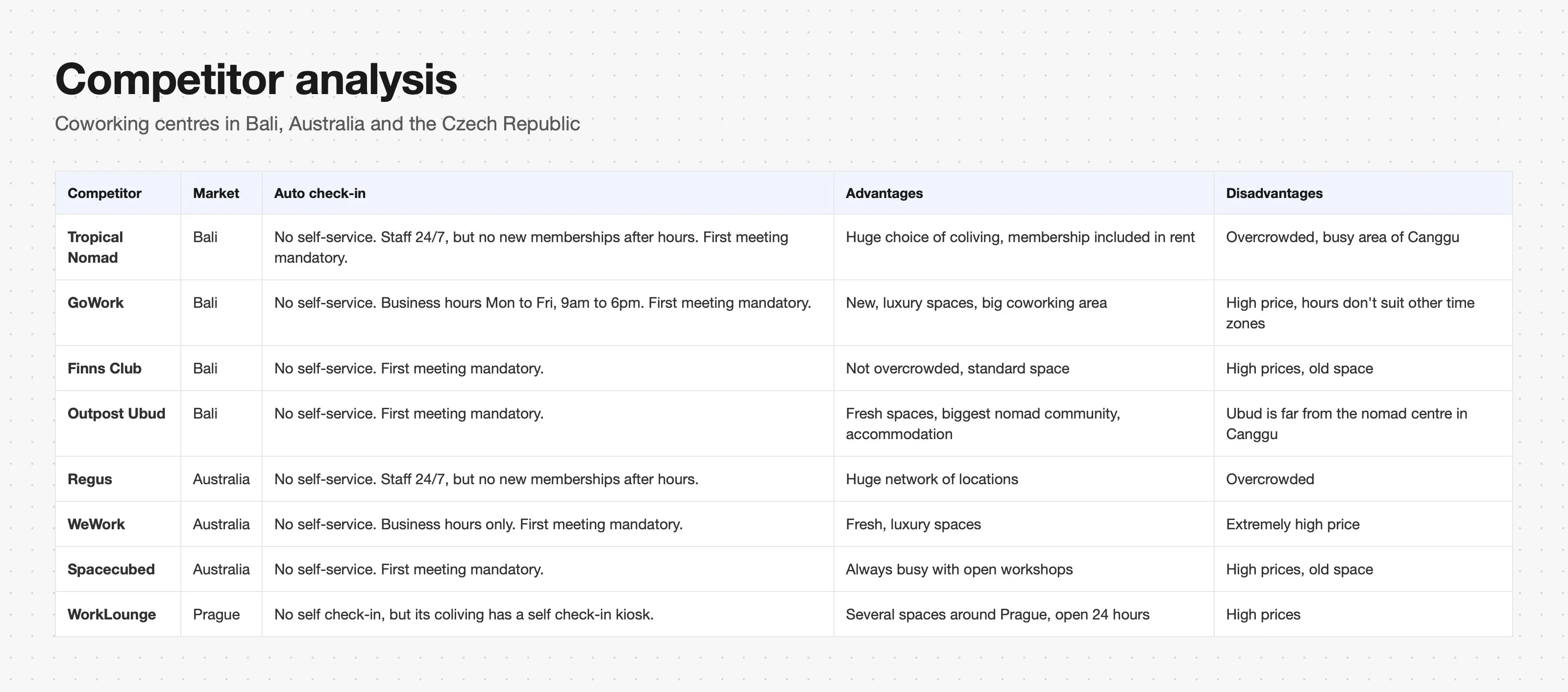
Coworking centres in Bali, Australia and the Czech Republic: none offers immediate registration outside working hours. The common pattern is an introductory meeting with a member of staff. The one exception, in Prague, has a hotel kiosk that issues a card working as both room key and coworking access.
/03
Problem statement
“B Work was designed to provide a flexible working environment during normal working hours. The centre does not allow ad hoc access for new users outside business hours, which results in lost leads, unused space and limited access for professionals with urgent needs.”
How could we create a solution that allows easy registration and access outside business hours, while increasing usability and revenue?
Ideate
A workshop with members, then back to the flow to see what the idea would actually remove.
/01
How Might We workshop
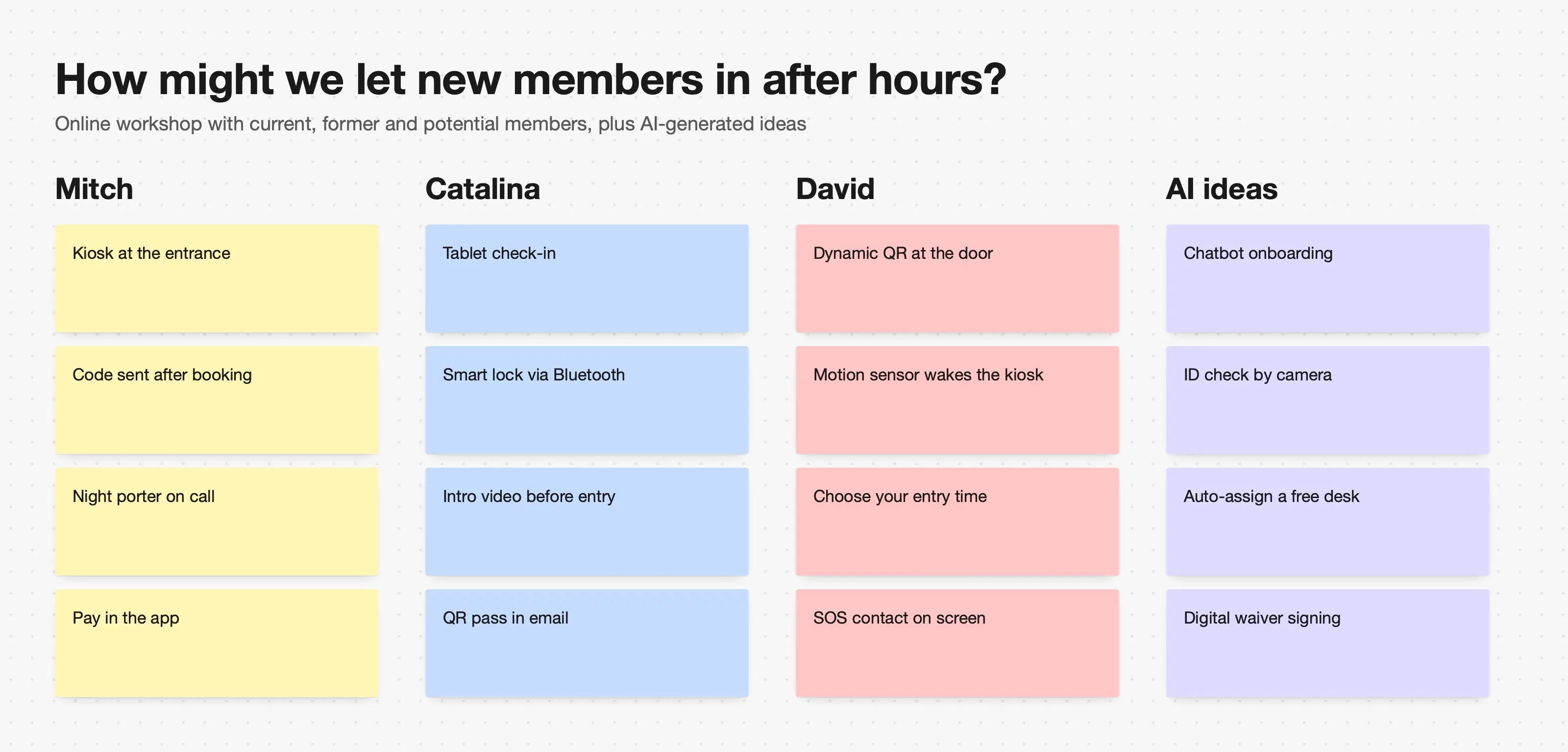
Run online with current members, one former member and one person who had never been to B Work. We also experimented with generating ideas using AI.
/02
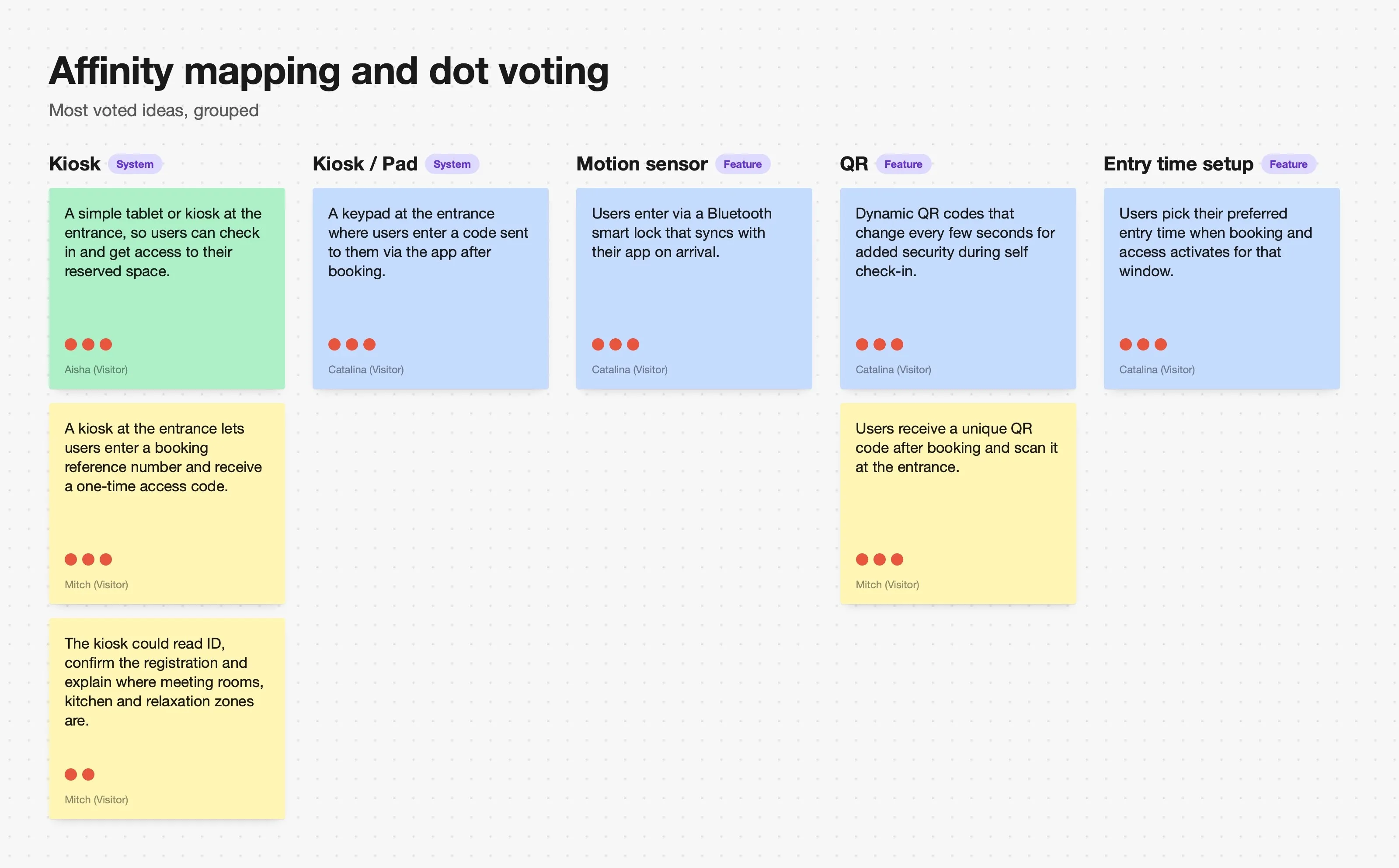
Affinity mapping and dot voting
The most voted ideas were grouped with affinity mapping. Decisions that came out of it:
A kiosk, the kind you know from airports or McDonald's, as the form of access.
Not just a tablet: it would need a separate payment terminal.
Cash payment kept in the first design to test whether anyone wants it.
The key in an app: the kiosk takes payment, then the access key lives as a QR code in the app.
/03
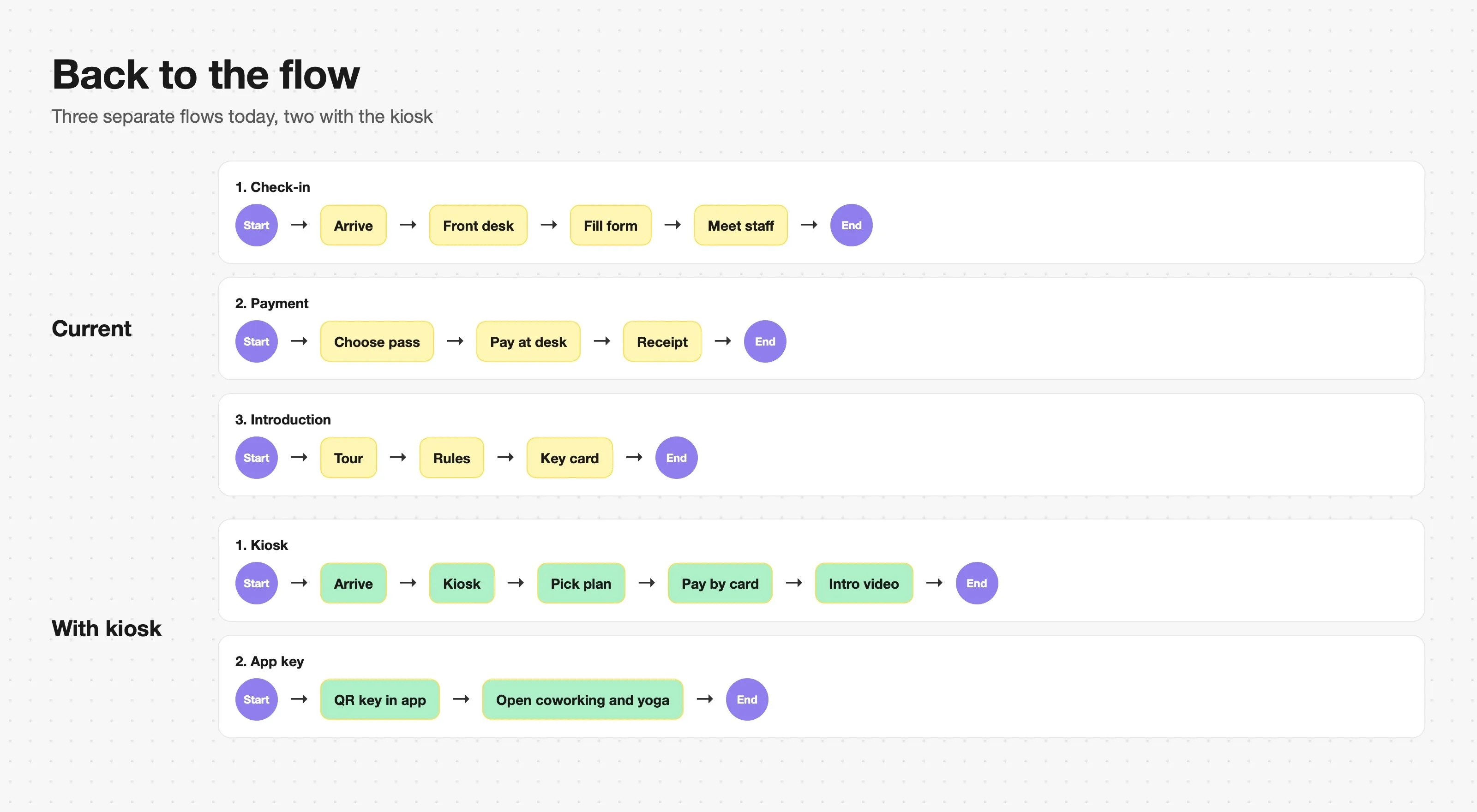
Back to the flow
Simulating the basic use case showed the solution could remove up to two redundant flows: check-in, payment and introduction happen at the kiosk, and the app becomes the key to both the coworking and the yoga space.
/04
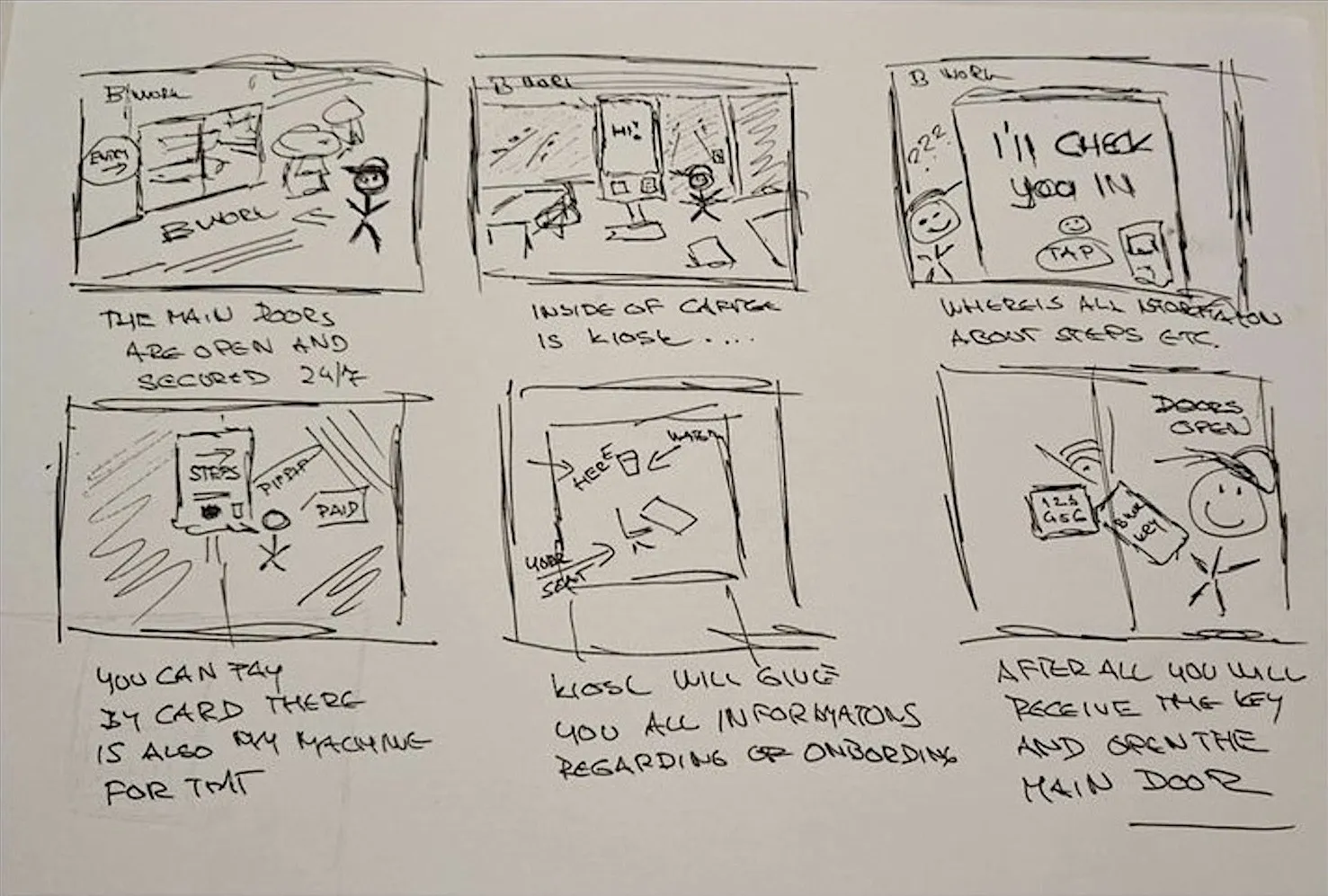
Storyboard
The workshop ran long, so instead of Crazy 8s I used a storyboard to turn all the ideas into concrete steps: open main doors, the kiosk inside, payment by card, an introduction to the space, and the key that opens the door.
/05
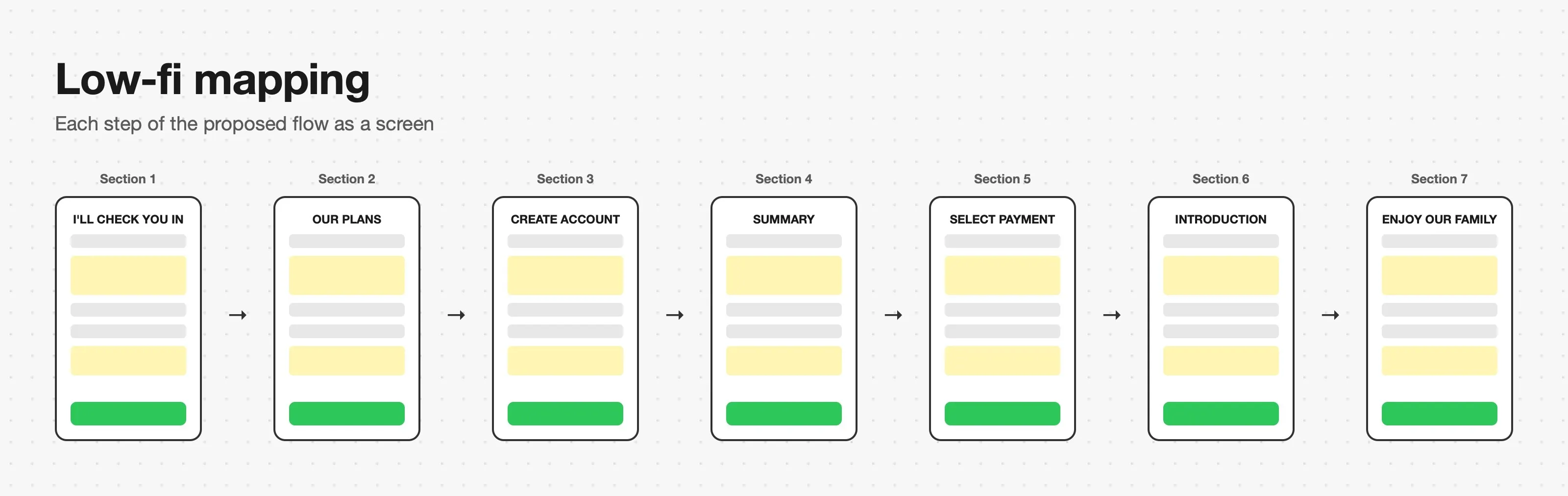
Low-fi mapping
Each step of the proposed flow simulated as a low-fidelity screen in FigJam, which defined the number of screens and their dependencies.
Deliver
From kiosk references and research to two rounds of testing and a heuristic review.
/01
Back to the competitors
Kiosks at McDonald's, Jetstar and AirAsia airports and in banks: they start with an inviting first screen, combine touch with buttons and audio, and end with a printed or emailed summary. A Scite.ai literature review backed the idea: self check-in improves speed and satisfaction, but should keep a human touch.
/02
First prototype
Built in Figma with real content so testers worked with actual data: the kiosk screen, the app with the key, and the smart lock on the door.
/03
User testing
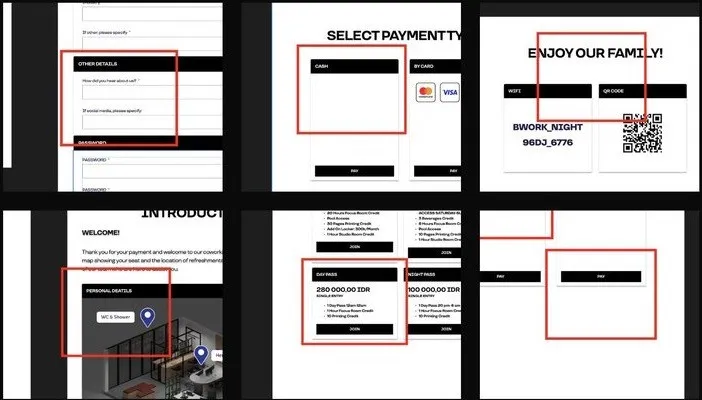
6 respondents, 10 issues: 1 critical, 7 medium, 2 low. The top ones: taxes and total price not shown, a form asking for things like “how did you hear about us”, cash payment that made no sense, a 3D map nobody would remember, unclear passes and a confusing closing text.
/04
Second round
All issues fixed and tested again online with 5 respondents: 5 findings, 1 medium and 4 operational. People asked for an SOS contact or AI assistant, language options, a mandatory intro video with the rules, a way to cancel the whole process, and visible progress steps.
/05
Final prototype and heuristic review
The final prototype checked against Nielsen's ten heuristics. Error states, including system errors, and documentation were added where the review found gaps.
Outcome
Handed over to B Work management, with an honest look back.
/01
Final delivery
I moved from Bali to Australia, so my membership ended, but I finished the challenge up to the final prototype and handed documentation, visual designs and data sheets to the centre's manager.
/02
Retrospective
The kiosk meets the challenge and users prefer it to booking an appointment. But the process did not consider users with special needs, which I see as a personal failure. The stakeholder interview by questionnaire was not enough to frame the business needs, and as facilitator I let the kiosk idea run without questioning its cost or a mobile-only alternative.
/03
What I learned
No coworking centre has a self-service terminal, because management prefers to welcome people in person. Next time I would push for real access to the main stakeholder before starting, and use Crazy 8s to anchor ideas rather than relying on my own storyboard.
© More works
(WDX®)
digital design



© help centre
(WDX)
clarification









Let’s talk